Plugins
Who activated or updated a WordPress plugin?
The Plugins screen shows what is installed now. It names the plugin, the version on the site, and who wrote it. It does not name the account that activated or updated it.
If Sentinel was already recording, open Sentinel → Activity Logs and choose Plugins. An activation names the plugin, the account that switched it on, and when. A successful update records the plugin, the time and the resulting version, together with the acting account when available. Installing Sentinel afterwards cannot recreate an activation or an update that has already happened.
In the standard WordPress installation screen, installing adds the plugin's files. Activating it is a separate step that switches it on. An activation record does not prove who originally installed the plugin.
Checked on WordPress 7.1.4, and the Sentinel section on Sentinel 1.2.5, on 10 November 2026. WordPress documents the screen in Manage Plugins.
The Plugins screen
Open Plugins. Each row is the plugin as it stands today.

By WordPress Contributors is the author credit for the plugin. It is the person or team who wrote it.
Updating replaces the plugin's files with another version. WordPress can also update a plugin in the background when automatic updates are enabled for it.
Sam activated Classic Widgets and updated it
Sam Okonkwo activated Classic Widgets, then updated it from 0.2 to 0.3. The activity row for the update records the version that landed, 0.3.

Open Sentinel → Activity Logs and choose Plugins. The range starts at the last 7 days. For an older live row, choose Last 30 days or All retained, then Filter.
More filters has Event type. Choose Plugin updated or Plugin activated when you want one of those actions. The account is on the row, so leave User at All users until a row has named the account. After that, the User filter shows other events for that account.
The search box matches an account, an IP, or words in the event label. It does not match the plugin's name, so it will not find Classic Widgets. Read the plugin name on the row.
The update row reads Classic Widgets was updated to version 0.3. The chip is Sam Okonkwo. Under it, Classic Widgets was activated, with the same account. The time at the end of the row is how long ago Sentinel recorded the action.
The name on the row is an account. If several people share that login, the name does not tell you which person was sitting there.
Open the update row for the clock time and the plugin file.
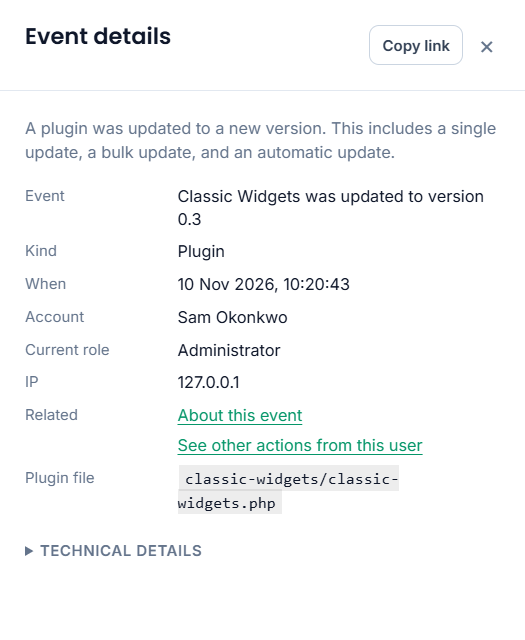
When is the time Sentinel recorded the event, in the site's timezone. Account is the account stored for that action. Plugin file is the plugin's file on the site. The version in an update sentence is the version after a successful update. Sentinel does not keep the version it replaced. An activation has no version.
Switching a plugin off is recorded too. That row names the plugin, the account, and the time.
Automatic and bulk updates
When WordPress updates a plugin in the background, the row says the plugin was updated automatically and names the version that landed. The account shows Guest. Guest means no authenticated account was recorded for that update. It does not mean a visitor updated the plugin.
A bulk update writes one row for each plugin that updated. The sentence ends with (bulk update), and the account is the account that ran it. A plugin that did not update does not get a row.
When there is no row
A missing row does not prove the action never happened. Check these:
- Sentinel was not recording yet. The record starts with the next activation, deactivation, or successful update.
- A filter is hiding it. The range starts at the last 7 days, and More filters can limit the event type, the account, the priority, or the dates. Clear returns to the default list. Choose Plugins again and widen the range.
- The row has left the live list. On the schedule in Sentinel → Settings → Data & retention, older live rows move to the archive, and rows past the live cap do too. Activity Logs does not show the archive. Download it from Sentinel → Settings → Export & API, with Source set to Archive. Settings describes how long live and archived rows are kept. After the archive retention period, Sentinel deletes those rows. They are no longer available through Sentinel unless you retained a separate copy. Export & API is the download.
- Someone installed the plugin and left it inactive. Sentinel records the activation, the deactivation, and a successful update. The install on its own is not one of those events.
- The update did not succeed. A failed update is not stored as an update.
- The plugin was removed. Sentinel does not add a deleted row. If it was switched off first, that deactivation remains. Once the plugin files are gone, that row shows the plugin file path rather than the name it had on the screen.
- That event has been switched off under Sentinel → Event Registry. Plugin events are recorded while Sentinel is active, unless one of them has been switched off there.
What to do next
Look at Plugins for the version that is installed now, and treat the author credit as who wrote the plugin. If Sentinel was already recording, the Plugins view is where you match an activation or an update to an account and a time, and a successful update to the version that landed. An update near a fault is a lead. Compare it with what else changed, including who changed a page, before you blame the plugin.