Content
Who changed a WordPress page?
Open the page and look at Revisions. Where WordPress has two stored versions to compare, it names the account that saved each one and shows the text. That is the first place to answer who changed this page.
The Author field in the sidebar is the account the page is assigned to. Someone else can save the page while that field stays the same.
Checked on WordPress 7.1.4, and the Sentinel section on Sentinel 1.2.5, on 9 November 2026. WordPress documents the screen in Revisions.
Where are Revisions?
In the block editor, open the page, open Settings if the sidebar is closed, and stay on the Page tab.
Author is the assigned account. Revisions shows how many stored revisions the page has. Click that number.
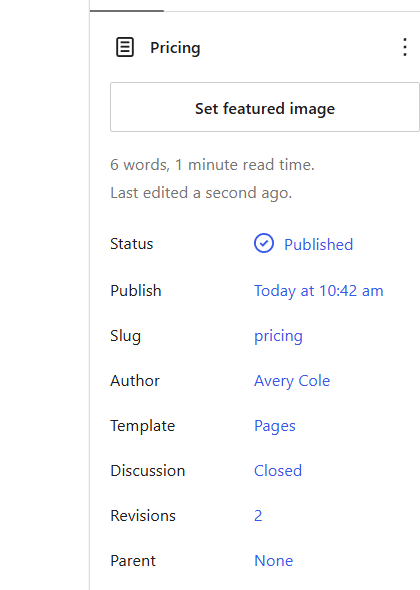
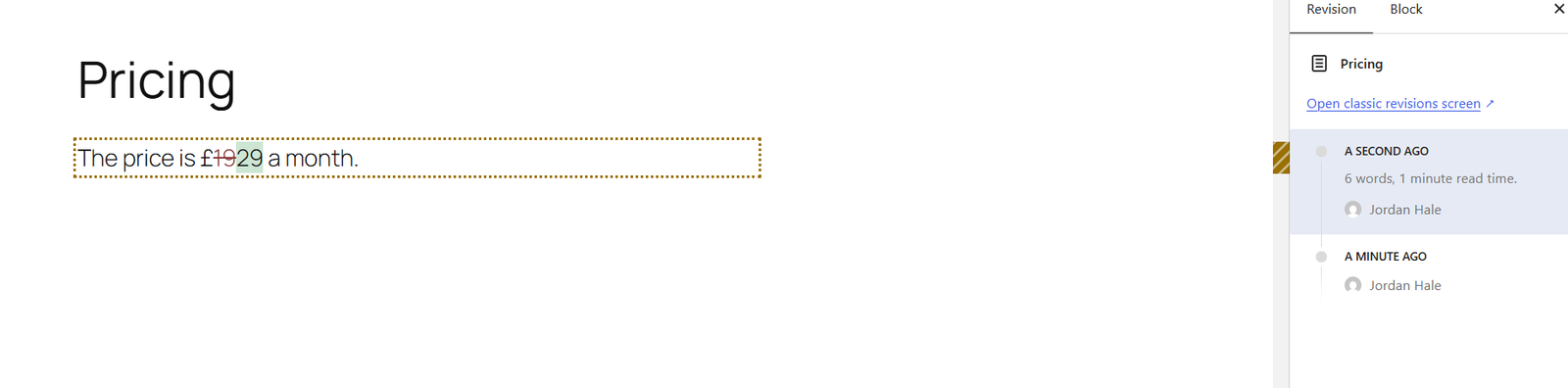
You land on a comparison. Removed text and added text are marked. The list names the account for each stored revision and how long ago it was saved. Restore replaces the current page with that version, so read it before you restore.
An autosave, when one exists, sits in the same list and is marked Autosave. WordPress keeps one autosave per account and replaces it.
You can open Revisions when your account is allowed to edit that page. The name on a revision is an account. If several people share that login, the name does not tell you which person was sitting there.
A price that changed
Avery Cole is the Author of a page called Pricing. Jordan Hale, an Editor, publishes it as “The price is £19 a month.” He then changes the price to £29 and saves.
WordPress keeps both. The first stored revision is the £19 text, from the save that put that wording on the page. The next revision is the £29 text, from the save that changed it. Both name Jordan Hale. The Author field still says Avery Cole.
The Revisions row appears in the block editor once there are two stored revisions to compare. A further save that changes the text normally adds another.
WordPress normally stores a new revision when the title, the content, or the excerpt differs from the last stored revision. It can also store one when meta registered for revisions has changed. A plugin can change that behaviour. A save that changes none of those does not normally add a revision.
Why can't I see any revisions?
Work through the likely causes before you assume the edit is gone:
- The page may have only one stored revision. The block editor shows the Revisions row once there are two to compare. In the editor, the text you publish can already be that first stored revision. The comparison appears when a later save changes it.
- Imported or programmatically created pages may not have a revision of their initial content.
- The later save may not have changed the title, the content, the excerpt, or revisioned meta.
- Revisions may be capped or switched off. When a cap is reached, WordPress drops older stored revisions. Switching them off stops new ones from being stored. Revisions explains the setting. Changing it now does not recover an edit that has already happened.
- The edit may not be in the page body. A template, a header, a builder layout, or a custom field can live somewhere else. Some of those tools keep their own history, and some register their data so WordPress revisions include it. Open the screen where that content is edited and see what it kept.
- Your account may not be allowed to edit the page. On a default site, the Author role can edit their own posts and cannot edit pages.
- Someone may have deleted the revision.
If the stored history is missing, a backup or a host snapshot can still hold an earlier copy of the content. Check those before you decide the text is gone. Finding the old wording and naming the person who edited it are different questions. A backup may give you the text and still say nothing about who saved it.
When you want the saves in one list
Revisions live on the page you already have open. There is no Revisions screen that lists every page on the site.
If Sentinel was already recording, open Sentinel → Activity Logs and choose Content. The page saves from that day are there, and you can open the page in Revisions for the wording.
If it was not recording, install Sentinel Free and the list starts with the next save. Installing it afterwards cannot recreate a save that has already happened.
What Sentinel shows
Sentinel Free records a published page being saved, when it is already recording. Open Sentinel → Activity Logs and choose Content. Each row gives the page, the time, and the authenticated account when one was available. An action with nobody signed in says No signed-in user. With the default settings, the time is the time of the save itself.
An update row records a save; it does not necessarily mean the wording changed. Use Revisions to compare the text.

Open a row for Account and Current author. Account is the identity stored for that save. Current author is the account assigned to the page today, so it can be someone else. On Sentinel Free 1.2.5, a new save stores the authenticated account when there was one, rather than the page’s assigned author. Older events recorded before this fix may still name the page’s assigned author rather than the account that performed the save.
The search box matches a user, an IP, or an event. The page title is already written in the row, so read the Content list. How long those rows stay, and the rest of the screen, is covered in Activity Logs.
A short note on Sentinel+
Sentinel+ adds the wording to a published page update, when Sentinel Free and Sentinel+ are both recording at the time. It keeps the title before and after, and a plain-text passage of the content. Short text is kept whole. On a longer page it keeps about 500 characters, starting just before the first difference.
Installing Plus later does not reconstruct earlier changes. The account on the card is the account Sentinel Free 1.2.5 stored for that save. Cards are kept for 180 days. Free keeps its own activity log.
What to do next
Open Revisions on the page. When two stored versions exist, you have the account that saved each one and the text at that point. If that history is missing, check a backup, and treat a missing revision as a missing copy of the text rather than an answer about who edited it.
When Sentinel is already recording, Activity Logs brings those page saves together: the page, the time, and the account when someone was signed in. Revisions is where you compare the wording.